Technical Guides
Guide 3: 3D Modeling And 3D Printing
Introduction
3D Modelling, Animation and Rendering Software
The concept of using an interactive, 3D dimensional display to manipulate geometric forms in virtual space was first introduced by computer scientist Ivan Sutherland in 1963. This created a revolution not only in personal computing but in engineering and architecture which synthesized the multiple roles of designer, draftsman and engineer into a single role, using computer aided design software like AutoCAD, introduced by AutoDesk in 1982. In the early 1990’s a number of 3D computer graphics programs specifically designed for computer games and cinema special effects were released including 3D Max and Maya. These software platforms not only allowed the user to create extremely detailed, high polygon, high resolution models but also provided the ability to animate these models, create interactive, 3D environments, control lighting, camera movement, object and environment physics and export high resolution animations or 3D projects which could be imported into game engines for development. In the 2000’s cheaper or free, open-source alternatives to these programs became increasingly popular such as Google SketchUp for architecture and interior design modelling and Blender, which incorporated many of the same tools and features as 3D Max and Maya, at zero cost. The basic principle of 3D animation is that it allows the user to manipulate and ‘sculpt’ three-dimensional shapes such as cubes, spheres, cones and cylinders by scaling, rotating, moving and extruding their corners (vertex), lines (edges) and faces (polygons). Through this basic process, it is possible to create complex, highly detailed three-dimensional models of virtually anything. To increase the realism of these models, the user can attach raster images (in the form of .jpg or .png files) to their surface, and then use the principle of keyframing to animate the models. Additional features using physics and particles to simulate various natural phenomenon such as clouds, rain or hair and behaviors such as falling, wind, gravity and the movement of clothing. Finally, these models and environments can be exported as images or animations in various high-resolution formats using a process called rendering, which incorporates various simulated principles of light and perception to create the illusion of photorealism.
3D Printing
The basis of 3D printing technology has existed since the 1960’s, though it was not until advances in the understanding of materials which affected cost that the technology moved from industrial applications to general availability at the consumer level. The fundamental principle of 3D printing follows the same approach as 2D inkjet printing, but instead of ink uses heated resin and plastic polymers printed from a 3D model in additive ‘slices’. In 2005, the first 3D printer which could ‘print’ itself was released as a crowdfunding project entitled RepRap which would lead to the technologies alignment with the nascent open-source, maker movement and the widespread commercial release and success of the MakerBot desktop 3D printer. Since that time, 3D printers have gotten cheaper and more sophisticated, printing in multiple materials such as metal, rubber, arcylic and ceramic while offering a full range of color printing options. Thus, the technology has been adopted in the fields of electronics, engineering, architecture as well as by artists.
3D Scanning / Photogrammetry
(A more recent method of creating 3D models and environments is to capture them from real objects and real location. This is done by 3D scanning, which involves either using special hardware such as LIDAR scanners to map out the position of points on an object, or by processing photos of multiple angles of an object/scene to calculate the 3D shape.
These can either be processed into a mesh (solid 3D shape) which is suitable for graphics work or for 3D printing, a point cloud for a more abstract representation of the scene (can be good for artistic/VR works), or gaussian splatting. Gaussian splatting is a recent technology which is excellent at capturing transparent or reflective materials, but cannot create a solid model for 3D printing.)
A more recent method of creating 3D models is to capture them directly from real objects and locations. This is done through 3D scanning. It can use special hardware such as LiDAR scanners, or by processing multiple photographs of an object or scene from different angles to calculate the 3D shape.
Phone-based photogrammetry allows users to create 3D models using only a smartphone. The reconstruction software works by identifying matching visual feature points across many images. To succeed, users must follow some basic rules. Every photograph needs to share at least 70% visual overlap with the previous and following shots. Without enough overlap, the software cannot align the images properly, which leads to holes, distorted geometry, or complete failure.
It is important to capture the object using three distinct orbital passes at different heights rather than shooting from a single position. The first pass is from a low angle, pointing slightly upward to record the base and undercuts. The second pass is at eye level for the main vertical surfaces. The third pass is from a high angle, pointing downward to capture the top surfaces.
Success also depends on good environmental conditions. Use flat, diffuse lighting such as overcast outdoor light or controlled studio setups to avoid strong shadows that change as the camera moves. Keep the object in consistent sharp focus with good depth of field. Avoid highly reflective surfaces like glass or polished metal, uniform featureless objects, and anything that is moving.
Mobile devices offer two main capture approaches. LiDAR mode, available on newer iPhones and iPads, uses depth-sensing hardware to quickly measure distances and works well for large objects and environments, though it may have lower detail on small features. Photo mode relies on high-resolution images processed through photogrammetry software. This approach provides better surface detail and texture when maximum quality is needed.
After processing, the scan can be exported in different formats depending on its use. The .obj format with .mtl material file is standard for work in Blender, Unity, or similar tools, as it includes both geometry and textures. The .ply format stores a point cloud with color information, which is useful for certain visual effects. For 3D printing, .stl or .3mf formats are used. These focus on geometry only and require the model to be watertight with no holes, which can be checked and repaired in software such as Meshmixer.
AI Resources in 3D Modeling and Scanning
Artificial Intelligence has changed 3D creation by making advanced tools available to more people. These systems now act as assistants that speed up many parts of the workflow.
AI can generate 3D models from simple text descriptions or rough sketches. This allows quick prototyping without starting from basic shapes. Tools also create realistic textures from single photographs, producing materials that react naturally to virtual lighting. In addition, AI helps clean up scanned models by automatically repairing holes, smoothing surfaces, and reducing file sizes for better performance in games, websites, or printing.
These capabilities reduce the time needed for technical tasks and let creators focus more on ideas and design.
AI Resources in 3D Modeling and Scanning
Artificial Intelligence has changed 3D creation by making advanced tools available to more people. These systems now act as assistants that speed up many parts of the workflow.
AI can generate 3D models from simple text descriptions or rough sketches. This allows quick prototyping without starting from basic shapes. Tools also create realistic textures from single photographs, producing materials that react naturally to virtual lighting. In addition, AI helps clean up scanned models by automatically repairing holes, smoothing surfaces, and reducing file sizes for better performance in games, websites, or printing.
These capabilities reduce the time needed for technical tasks and let creators focus more on ideas and design.
Tools
[Table]
- Software
- Key features
- Access
- Ease-of-use
Blender
- Open-source, 3D modeling and animation software
- [Key features]
- 3D modelling and rendering of still images and animations
- Rigging models for animation
- Texturing 3D models
- Procedural modelling for creating complex 3D objects
- 3D modelling of architecture
- 3D modelling of interiors
- Building models for 3D printing
- Editing and cleaning up 3D scans
- Free
- Intermediate to Advanced
Autodesk
- 3D Max 3D modeling and animation software
- [Key features]
- 3D modelling and rendering of still images and animations
- Rigging models for animation
- Texturing 3D models
- Procedural modelling for creating complex 3D objects
- 3D modelling of architecture
- 3D modelling of interiors
- Building models for 3D printing
- Editing and cleaning up 3D scans
- Paid with subscription
- Intermediate to advanced
Maya
- 3D modeling and animation software
- [Key features]
- 3D modelling and rendering of still images and animations
- Rigging models for animation
- Texturing 3D models
- Procedural modelling for creating complex 3D objects
- 3D modelling of architecture
- 3D modelling of interiors
- Building models for 3D printing
- Editing and cleaning up 3D scans
- Paid with subscription
- Intermediate to advanced
Sketchup
- 3D modeling software released by google for computer aided design (CAD)
- [Key features]
- 3D modelling of interior and exterior architecture
- Real world measurements
- Easy to use for beginners
- Low quality rendering
- Does not require high speed computer to run compared to other 3D modeling software
- Free version with limited features, paid version with pro features
- Beginner
Cinema 4D
- 3D modeling and animation software
- [Key features]
- 3D modelling and rendering of still images and animations
- Rigging models for animation
- Texturing 3D models
- Procedural modelling for creating complex 3D objects
- 3D modelling of architecture
- 3D modelling of interiors
- Building models for 3D printing
- Editing and cleaning up 3D scans
- Paid with subscription
- Intermediate to advanced
Meshmixer
- 3D modelling software developed primarily for 3D printing
- [Key features]
- Resize and slice models for 3D printing
- Making 3D models ‘watertight’ for 3D printing (fill missing polygons)
- 3D printing related edits such as making a model hollow
- Compressing models for 3D printing
- Free
- Beginner to intermediate
Z-Brush
- 3D modelling software designed for high detail, high resolution models
- [Key features]
- Used for creating ‘high resolution’ models for movies, games and animations
- High ‘polygon count’ giving the ability to ‘sculpt’ highly detailed models which are also lightweight when exported into other software for animation.
- Paid with subscription
- Advanced
Nomad
- 3D modelling software designed for high detail, high resolution models
- [Key features]
- Cheaper alternative to Z-Brush with similar features and free demo version.
- Paid
- Advanced
Rhino + Grasshopper
- 3D modelling software with advanced parametric design tools
- [Key features]
- Precise NURBS surface modelling
- Parametric modelling using node-based Grasshopper system
- Algorithmic and generative design workflows
- Widely used in architecture and product design
- Complex geometric control and fabrication-ready modelling
- Integration with CNC and digital fabrication tools
- Paid license (Grasshopper included with Rhino)
Student discounts
Free 90 day trial - Intermediate to Advanced
Houdini
- Node-based procedural and parametric 3D modelling and VFX software
- [Key features]
- Fully procedural and parametric modelling workflow
- Node-based system for non-destructive modelling
- Algorithmic and generative design capabilities
- Complex geometry creation through rules and parameters
- Industry-standard for simulation and VFX
- Modelling features available in free Apprentice version (non-commercial use)
- Free Apprentice version (modelling included), Paid Indie & Studio versions
- Advanced
Meshroom
- Photogrammetry 3D scanning software
- [Key features]
- Used to generate point clouds and full color meshes from photographs
- Free open source
- Intermediate
Realityscan
Photogrammetry 3D scanning software
- Used to generate point clouds and full color meshes from photographs
- Created by Epic software, optimized for use with Unreal engine
- Can be used for non-Unreal based projects
Free open source
Intermediate
Jawset Postshot
- Gaussian splatting 3D scanning software
- [Key features]
- Used to generate gaussian splat 3D scans
- Can work standalone, or integrate with other photogrammetry software like Realityscan for higher quality results
- Paid subscription
- Intermediate
Lichtfeld Studio
- Gaussian splatting 3D scanning software
- [Key features]
- Used to generate gaussian splat 3D scans
- Requires use of other photogrammetry software like Realityscan to preprocess images
- Free open source
- Advanced
Luma AI
- Online Gaussian splatting
- [Key features]
- Used to generate gaussian splat 3D scans from videos
- Free for generating gaussian splatts, more advanced tools via subscription
- Beginner to intermediate
Tutorials
[Tutorial]
Blender
Autodesk 3D Max
Maya
Sketchup
Cinema 4D
Meshmixer
Rhino
Case Study
Sustainable 3D Printed Architecture
A group of designers Nof Nathansohn Elisheva Gillis, Gitit Linker, Noa Zermati, Adi Segal, Danny Freedman, Rebecca Hila Partook, and Or Naim at the Negev School of Architecture, Sami Shamoon College of Engineering, Beer Sheeva, Israel have been experimenting with the use of organic materials for 3D printing. In their project ‘To Grow a Building’, they used a custom-built robotic arm to 3D print architectural forms such as walls and garden beds, designed using AutoCAD 3D modelling software. However rather than using synthetic materials such as heated resin or plastic, it incorporates a mix of locally sourced soil and clay mixed with plant seeds. Over time, the seeds and their root systems interweave with the structures, making them stronger and eventually germinate and bloom into plants and flowers. Eventually, if the architectural feature needs to be demolished, the organic material can be easily returned to the soil without any ecological impact on the environment. This innovative use of 3D modelling and 3D printing is an example of the future of these technologies in sustainable design and architecture.
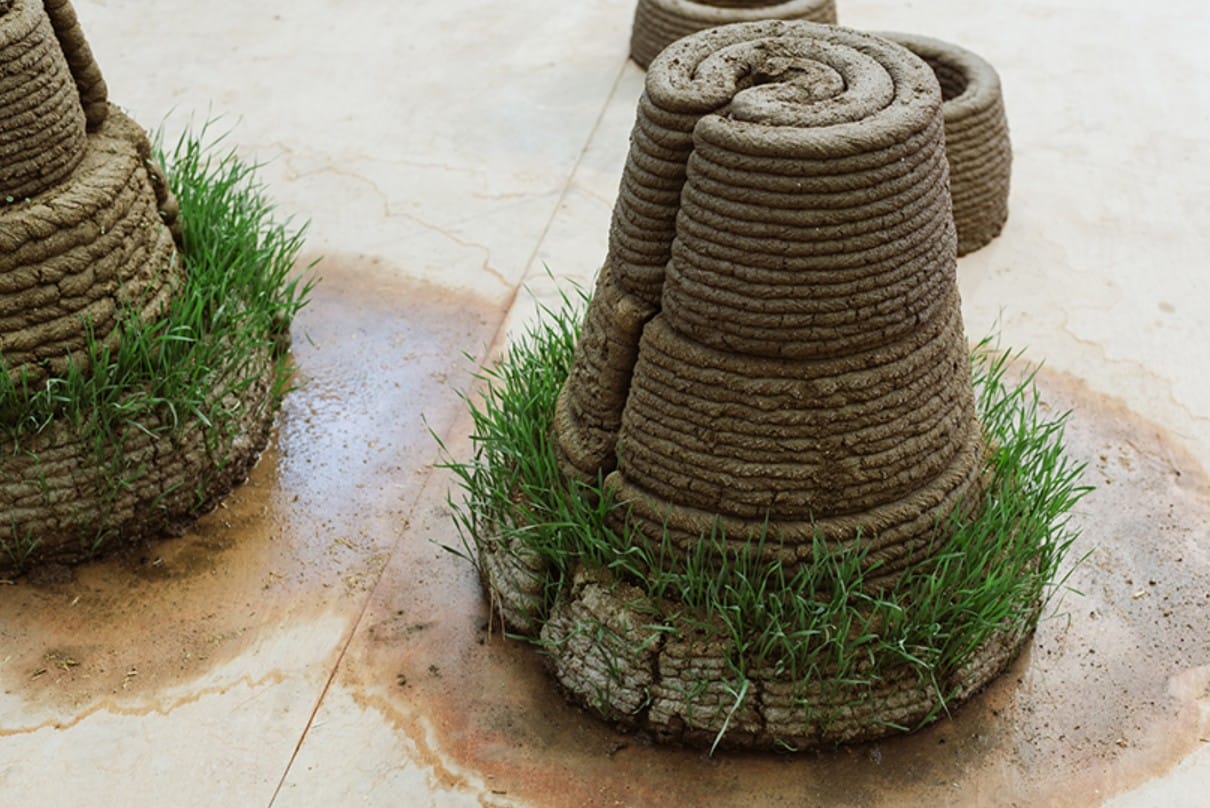
Sustainable 3D printed architecture (Nathansohn et al., 2025)
Campus Resources
[Table]
- Items
- Location
Pixologic: ZBrush
- 3D Scanning clean up, 3D Printing, 3D Modeling, 3D Sculpting
- [CUHK MakerSpace Location]
Autodesk Meshmixer
- 3D Scanning clean up, 3D Printing, 3D Modeling, 3D Sculpting
- Software installed on four high-performance workstations. [CUHK MakerSpace Location]
Autodesk Maya
- 3D Scanning clean up, 3D Printing, 3D Modeling, 3D animation, 3D Rendering, Create AR/VR Experience, gaming modeling
- Software installed on four high-performance workstations. [CUHK MakerSpace Location]
Autodesk 3ds Max
- 3D Scanning clean up, 3D Printing, 3D Modeling, 3D animation, 3D Rendering, Create AR/VR Experience, gaming modeling
- [CUHK MakerSpace Location]
Autodesk Mudbox
- 3D Scanning clean up, 3D Printing, 3D Modeling, 3D Sculpting
- [CUHK MakerSpace Location]
Blender
- 3D Scanning clean up, 3D Printing, 3D Modeling, 3D animation, 3D Rendering, Create AR/VR Experience, gaming modeling
- [CUHK MakerSpace Location]
SimLab Soft: Simlab composer 9.1
- 3D Rendering, Create AR/VR Experience
- [CUHK MakerSpace Location]
Solidworks
- 3D Printing, 3D Modeling, 3D animation, 3D Rendering, Mechanical modeling
- [CUHK MakerSpace Location]
XRCC
- Create AR/VR Experience, gaming modeling
- [CUHK MakerSpace Location]
Stratasys J55 Prime is a 3D Printer
- Multi-color and multi-material configurations with water-soluble support materials.
- Print Technology: PolyJet (PJ)
- Build Volume: 140 x 200 x 187 mm
- Layer Resolution: 18 microns / 0.018 mm
- Software: GrabCAD Print
- File Formats: .STL, .OBJ (with .MTL for texture), .3mf, .vrml; output: .PRINT
- Service printer operated by Library staff. Submitting your 3D print request to the Learning Garden HelpDesk from 9:00 am to 5:00 pm Monday to Friday.
[CUHK MakerSpace Location]
Creality K1C
- [Specs]
- Technology: FDM (Fused Deposition Modelling)
- Build Volume: 220 x 220 x 250 mm
- Layer Resolution: 0.1 - 0.35mm
- Filament Diameter: 1.75 mm
- Printer start-up time: 5 minutes
- Software: Creality Print
- File Format: .STL, .OBJ, Output: .GCODE, .CXPRJ
- Filament: PLA (bio-degradable polymer)
- Service printer operated by Library staff. Submitting your 3D print request to the Learning Garden HelpDesk from 9:00 am to 5:00 pm Monday to Friday.
[CUHK MakerSpace Location]
Formlabs Form 3+
- [Specs]
- Print Technology: Stereolithography (SLA)
- Dimensions: 405 x 375 x 530 mm
- Build volume: 145 x 145 x 193 mm
- Layer Resolution: 25-300 microns / 0.025-0.03 mm
- Software: PreForm
- File Formats: Input: .STL, .OBJ, Output: .FORM
- Service printer operated by Library staff. Submitting your 3D print request to the Learning Garden HelpDesk from 9:00 am to 5:00 pm Monday to Friday.
[CUHK MakerSpace Location]
Ultimaker 3 and Ultimaker S5
- [Specs]
- Print Technology: Fused Filament Fabrication (FFF)
- Print head: Dual extrusion print head with an auto-nozzle lifting system and swappable print cores
- Dual Extrusion Build volume:
- Ultimaker 3: 197 x 215 x 200 mm
- Ultimaker S5: 330 x 240 x 300 mm
- Print speed: 30 to 300 m/s
- Filament diameter: 2.85 mm
- Software: Ultimaker Cura
- File Formats: .STL, .OBJ
- Service printer operated by Library staff. Submitting your 3D print request to the Learning Garden HelpDesk from 9:00 am to 5:00 pm Monday to Friday.
[CUHK MakerSpace Location]
HandyScan 700
- [Specs]
- Light Source: 7 Laser crosses Scanning area: 275 x 250 mm
- Max. Accuracy: 0.03 mm
- Max. Resolution: 0.05mm
- Acquisition Speed: 480,000 points/s
- Part Size Range: 0.1 - 4 m
- Output file format: STL, OBJ, DAE, FBX, MA, PLY, TXT, WRL, X3D, X3DZ, ZPR
- There is no charge to use 3D scanners provided by the MakerSpace. Learning Garden HelpDesk from 9:00 am to 5:00 pm Monday to Friday.
[CUHK MakerSpace Location]
Ipad Pro for 3D Scanning
- [Specs]
- Model: iPad Pro (M4, 11-inch)
- Scanning range: 0.3m to 5m +
- Camera: 12 million pixels wide camera
- Sensor: LiDAR Sensor
- TrueDepth Camera: 12 million pixels ultra wide camera
- Output file format: .OBJ (can be sent via email)
- There is no charge to use 3D scanners provided by the MakerSpace. Learning Garden HelpDesk from 9:00 am to 5:00 pm Monday to Friday.
[CUHK MakerSpace Location]
Go! Scan Spark
- [Specs]
- Light Source: White light (99 stripes)
- Scanning area: 390 x 390 mm
- Max. Accuracy: 0.05 mm
- Volumetric Accuracy: 0.05 mm + 0.15mm/m
- Resolution: 0.1 mm
- Acquisition Speed: 1,500,000 points/s
- Texture colours: 24 bits
- Part Size Range: 0.1 - 4 m
- Output file format: STL, OBJ, DAE, FBX, MA, PLY, TXT, WRL, X3D, X3DZ, ZPR
- There is no charge to use 3D scanners provided by the MakerSpace. Learning Garden HelpDesk from 9:00 am to 5:00 pm Monday to Friday.
[CUHK MakerSpace Location]
Glossary
[Glossary]
Mesh
- A 3D object composed of polygons created via 3D scanning or 3D modelling.
Polygon
- The individual geometric planes which are the individual building blocks of a 3D mesh or model.
Procedural
- The use of different generative rules in 3D modeling software to create a 3D model.
.slt
- SLT file format refers to a 3D printing format which utilizes stereolithographic printing techniques.
.obj
- A 3D model file format which contains texture data.
.fbx
- A 3D file format which can also include animation data.
Watertight
- When a 3D model is prepared for 3D printing, it needs to be ‘watertight’ and free of holes and overlapping faces in the 3D mesh.
Slice
- Splitting a 3D model into multiple parts in order to accommodate the scale of the 3D printed object.
Rigging
- The process of attaching the animation data to a 3D avatar
Texturing
- Adding image raster files to the surface of a 3D model to create the effect of patterns and texture.
Particle Physics
- Generative animation used to simulate different fluids and lighting effects
Render
- The process of exporting a 3D animation as a video file.
Overhang
- When parts of a 3D model being prepared for 3D printing, any section which extends outward at an angle cannot be printed is known as ‘overhang’ and must be removed.
Filament
- The material which is used by a 3D printer to create the model, usually plastic or resin.
G-code
- The file format generated by slicing software that tells the 3D printer exactly how to move, where to print, and how much material to use.
Support Structures
- Temporary printed material added under overhangs to prevent collapsing during printing. Supports are removed after printing.
Layer Height
- The thickness of each printed layer. Smaller layer heights give smoother results but take longer to print.
Infill
- The internal structure inside a 3D print. Infill can be solid or patterned (e.g., grid or honeycomb) and affects strength and weight.
Tolerance
- The small amount of space left between parts so they fit together properly after printing.
Calibration
- Adjusting printer settings (bed leveling, temperature, extrusion rate) to ensure accurate and successful prints.
Extruder
- The part of the 3D printer that pushes filament through the heated nozzle.
Build Plate (Print Bed)
- The flat surface where the 3D model is printed.