Technical Guides
Guide 2: Video Editing And 360 Video Production
Introduction
Digital Video Editing
The history of film is tied to the transformations in technology and recording mediums used by filmmakers, which have moved from celluloid film to video to digital video in the course of 100 years. These transformations have been accompanied by the gradual democratization of the process, with Hollywood level production techniques becoming available to students and hobbyists on small budgets. An integral part of this has been the introduction of affordable digital single lens reflex cameras (DLSR’s) which allow for the use of cinema grade lenses with increasingly high-resolution sensors and file formats, which have gone from high definition (HD) to 4K to 6K and 8K to match the fidelity of film. Another key innovation has been the move from editing with physical film, to video editing decks to the emergence of dedicated video editing software platforms like Final Cut Pro, Adobe Premiere Pro and the colour grading suit Da Vinci Resolve. These software platforms allow the editor to have access all of their footage in any resolution and simultaneously edit video and sound, apply various SFX techniques such as chroma key, cropping, masking, cross-fades, perform colour correction operations like adjusting brightness, hue and saturation and white-balance. In addition to this, it is possible to use this software to do basic sound editing, mixing and mastering with the option to do multi-band sound equalization and compression on voice over narration and dialogue as well as apply various effects such as reverb, de-essing and noise gating. With user-friendly interfaces, these software platforms have given a new generation of film makers access to realize their creative ideas, while it has also allowed researchers to increasingly incorporate moving-image based outputs into their research.
360 Video Production
Since the introduction of the Oculus Rift VR headset in the mid-2010's, there has been a renaissance in immersive VR, AR and 360 video content since its initial introduction and demise in the 1990’s. One particularly popular form of immersive content is 360 video, filmed using custom 360 video cameras released by well-known camera brands like Ricoh and Leica, but also newer competitors like Samsung, Go Pro and Insta360. These cameras film in extremely high-resolution (4K, 6K and 8K and higher) equirectangular formats which stitch together two or more fish lens images into an image with 360 degree coverage. These 360 videos can be viewed either on the web in a browser in which the user is able to manually drag and scroll through different parts of an immersive image, or loaded onto a VR headset like the Meta Quest or HTC Vive. The same editing platforms can also be used to edit 360 degree film, such as Adobe Premiere Pro, which has integrated 360 video editing tools directly into the program, while maybe of the 360 degree camera brands also providing bespoke software to handle the specific file formats they use.
Virtual Exhibitions and 360 Photography
While 360 video is useful for moving stories, 360 panoramic photography has become a practical way to create interactive virtual galleries and online exhibitions. Studios such as MetaObjects have used this approach to document physical shows, preserve temporary installations after they close, and offer web-based experiences that remain available long after the original event. The same methods can also record outdoor sites, heritage locations, or spaces that many people find difficult to visit in person because of distance, access limits or physical barriers.
High-resolution panoramic photographs are taken at carefully chosen points throughout a space, usually with a dedicated 360 camera such as the Ricoh Theta or with a DSLR fitted with a fisheye lens mounted on a panoramic head. Each photograph captures a full spherical view from that position. These individual views are then linked together in software so that a visitor can move from one viewpoint to the next simply by clicking directional points, often called waypoints or hotspots, on the screen. The effect is similar to walking through the real space, jumping from one standing position to another. Some platforms also analyze the set of photographs to create a simple three-dimensional floor-plan or dollhouse view. This overview helps users understand the overall layout of the building or site before they begin exploring the individual panoramic rooms or outdoor areas.
Extra layers of information can be added directly onto the panoramas. Clicking on an artwork can open a higher-resolution detail photograph or a short information panel that would not fit clearly inside the wide panoramic image itself. Ambient sound, field recordings, short interviews or artist commentary can be triggered when the viewer reaches a particular location, adding an audio dimension to the visual space. Curatorial notes, archival text, captions and external web links can appear as overlays or pop-up windows. The finished result is a navigable online version of a physical exhibition that can be experienced on a computer, phone or VR headset. This gives wider and longer-lasting access to the original space and its contents, allowing people who could not attend in person to explore the exhibition at their own pace.
Tools
[Table]
- Software
- Key features
- Access
- Ease-of-use
iMovie
- Video editor for creating and exporting social media videos, short films and music videos
- [Key features]
- Cutting and resizing video clips
- Sequencing video clips
- Adding transitions (cross fades, animated transitions)
- Sound editing and synchronization with video
- Adding titles and subtitles to videos
- Adding music to videos
- Exporting in different file formats and resolutions (.mov, .MP4)
- Comes free with Apple Mac OSX operating system
- Beginner
Adobe Premiere Pro
- Advanced video editor for creating and exporting social media videos, short films, feature films and music videos
- [Key features]
- Cutting and resizing video clips
- Sequencing video clips
- Professional grade colour correction tools
- Effects (colour key for greenscreen, blur, mask, feathering, invert, black and white)
- Adding transitions (cross fades, animated transitions)
- Sound editing and synchronization with video
- Adding titles and subtitles to videos
- Adding music to videos
- Works with HD, 4K, 8K, 360° video
- Exporting professional in different file formats and resolutions (.MOV, .MP4, .MKV)
- Single time purchase
- Intermediate to advanced
Final Cut Pro
- Advanced video editor for creating and exporting social media videos, short films, feature films and music videos
- [Key features]
- Cutting and resizing video clips
- Sequencing video clips
- Professional grade colour correction tools
- Effects (colour key for greenscreen, blur, mask, feathering, invert, black and white)
- Adding transitions (cross fades, animated transitions)
- Sound editing and synchronization with video
- Adding titles and subtitles to videos
- Adding music to videos
- Works with HD, 4K, 8K, 360° video
Exporting professional in different file formats and resolutions (.mov, .MP4)
- Single time purchase
- Intermediate to advanced
Da Vinci Resolve
- Video software for colour grading, colour correction, visual effects, audio post-production and editing
- [Key features]
- Primarily designed for professional colour correction and grading
- Cutting and resizing video clips
- Sequencing video clips
- Professional grade colour correction tools
- Effects (colour key for greenscreen, blur, mask, feathering, invert, black and white)
- Adding transitions (cross fades, animated transitions)
- Sound editing and synchronization with video
- Adding titles and subtitles to videos
- Adding music to videos
- Works with HD, 4K, 8K, 360° video
- Exporting professional in different file formats and resolutions (.mov, .MP4)
- Free
- Professional
Jianying
- Free video editor released by ByteDance for the Chinese market
- [Key features]
- Cutting and resizing video clips
- Smartphone version of the software is also available for editing videos for social media
- Primarily Chinese language based
- Sequencing video clips
- Adding transitions (cross fades, animated transitions)
- Sound editing and synchronization with video
- Adding titles and subtitles to videos
- Adding music to videos
- Exporting in different file formats and resolutions (.mov, .MP4)
- Free
- Beginner
Shortcut
- Free, open-source video editor with intuitive interface
- [Key features]
- Cutting and resizing video clips
- Sequencing video clips
- Adding transitions (cross fades, animated transitions)
- Sound editing and synchronization with video
- Adding titles and subtitles to videos
- Adding music to videos
- Exporting in different file formats and resolutions (.mov, .MP4)
- Free
- Beginner
Insta360 Studio
- Video editor specifically for 360° video
- [Key features]
- 360 o video editing software designed for the Insta 360 camera but can be used with any 360 o degree footage
- Cutting and resizing video clips
- Sequencing video clips
- Adding transitions (cross fades, animated transitions)
- Sound editing and synchronization with video
- Adding titles and subtitles to videos
- Adding music to videos
- Exporting in different file formats and resolutions (.mov, .MP4)
- Free
- Intermediate to advanced
Mistika VR
- 360° camera stitching
- [Key features]
- Advanced software to stitch together the individual lens views of a 360 camera into a single 360 video
- Allows advanced controls of the stitching process to increase quality between lens views
- Supports flat and 3D stereo 360 video.
- Subscription
- Advanced
Tutorials
[Tutorial]
iMovie
Adobe Premiere Pro
Final Cut Pro
Da Vinci Resolve
Jianying
Shortcut
Insta360 Studio
Mistika VR
Case Study
Clouds over Sidra and the ‘Empathy Machine’
In 2015, the film directors Gabo Arora and Chris Milk presented their film ‘Clouds over Sidra’ at the World Economic Forum in Davos, Switzerland. The film follows a 12-year-old Syrian refugee named Sidra in the Za’atari refugee camp in Jordan. The innovative aspect of this film was the fact that it was shot using a Samsung Gear VR 360degree camera which not only captured the environment with full immersivity, but it positioned the audience of the film in the first-person perspective, so that for all intents and purposes, they were experiencing the world as Sidra. The use of 360 cameras completely re-writes the rules of film making, as the language and syntax of framing and editing must be completely adapted to the fact that there is no ‘frame’, but rather a completely immersive environment and editing as it were must follow the rhythms of life, rather than cinema, since the disruptions of the ‘cut’ is felt experientially. Chris Milk described VR and 360 filmmaking at this time as an ‘empathy machine’, given the immersive, first-person perspective the technology allows for the first time in history, the viewer is able to ‘experience’ and ‘empathize’ with the protagonist, rather than objectively observe from a third person perspective. This form of filmmaking is particularly important in the world of NGO’s, charities and international development in which organizations must convince wealthy donors such as governments and philanthropists to donate to their causes. To this end, images and short films have been used to publicize the various issues the institution seeking to raise money for. For Milk, 360 degree video is able to overcome the ‘empathy gap’ between the donors and the subjects and ultimately emotionally move them in ways that legacy media cannot.
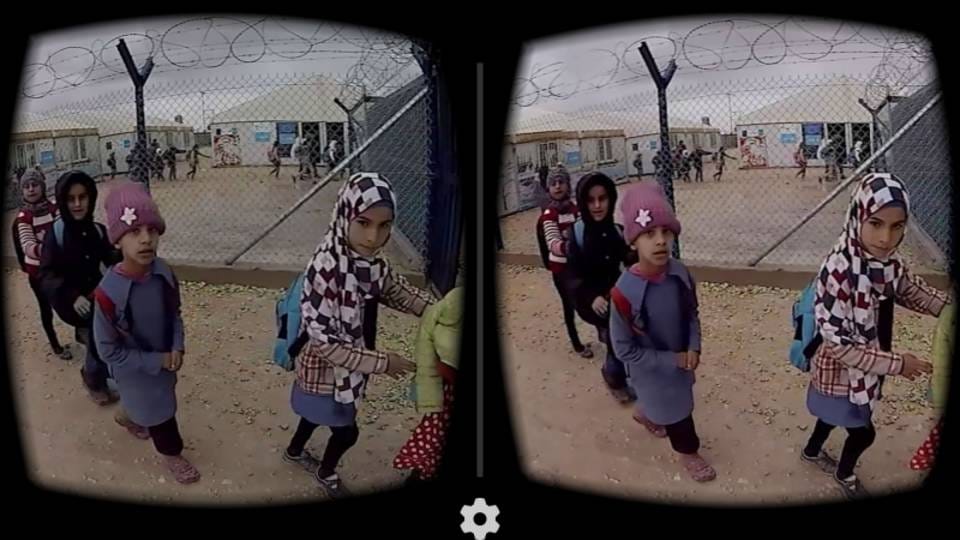
Virtual Heritage Projects: Tai Kwun and Lamma Mia
When physical access to cultural venues was limited during the COVID-19 period, Hong Kong art spaces began using 360 photography to keep exhibitions and outdoor projects available online. MetaObjects produced two examples of this approach.
For the exhibition 'My Body Holds Its Shape' and 'Poetic Heritage' at Tai Kwun Centre for Heritage and Arts, MetaObjects created a virtual gallery tour. The indoor spaces were photographed from multiple points and linked together so that visitors could move through the gallery on a computer, phone or simple VR viewer. Information panels and higher-resolution images of the artworks were added on top of the panoramic views. In this way a temporary exhibition was preserved as a permanent online archive.
A second project, Lamma Mia, documented outdoor public art and community sites around Sok Kwu Wan on Lamma Island. Panoramic photographs were taken across fields, piers, temples and coastal paths, then connected into an interactive web tour. Additional layers such as short texts, detail images and ambient sound recordings were included so that remote visitors could explore both the artworks and the wider environment of the island. Together the two projects show how 360 panoramic photography can record indoor exhibitions and outdoor heritage sites, making them accessible beyond the original physical event.
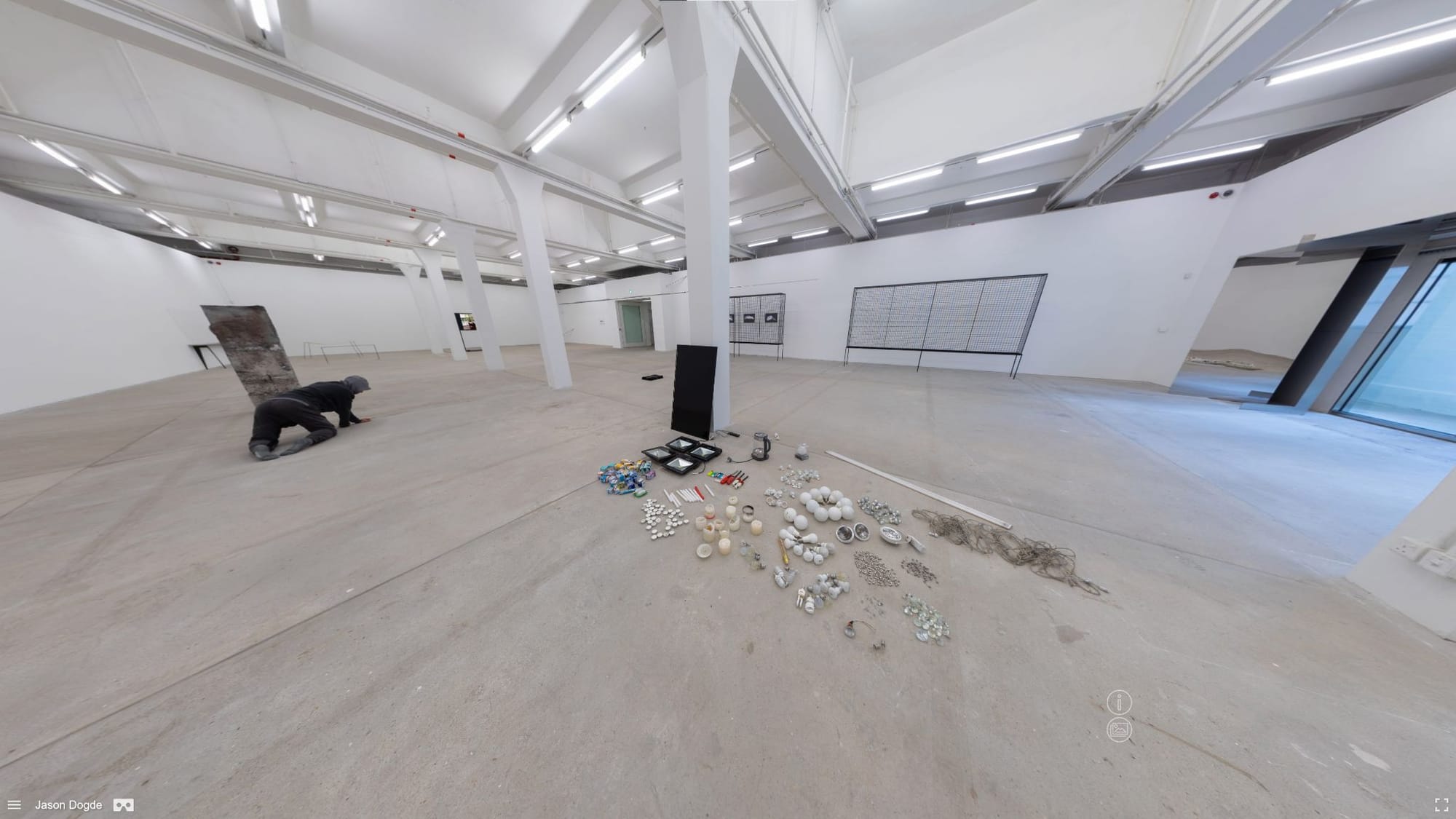
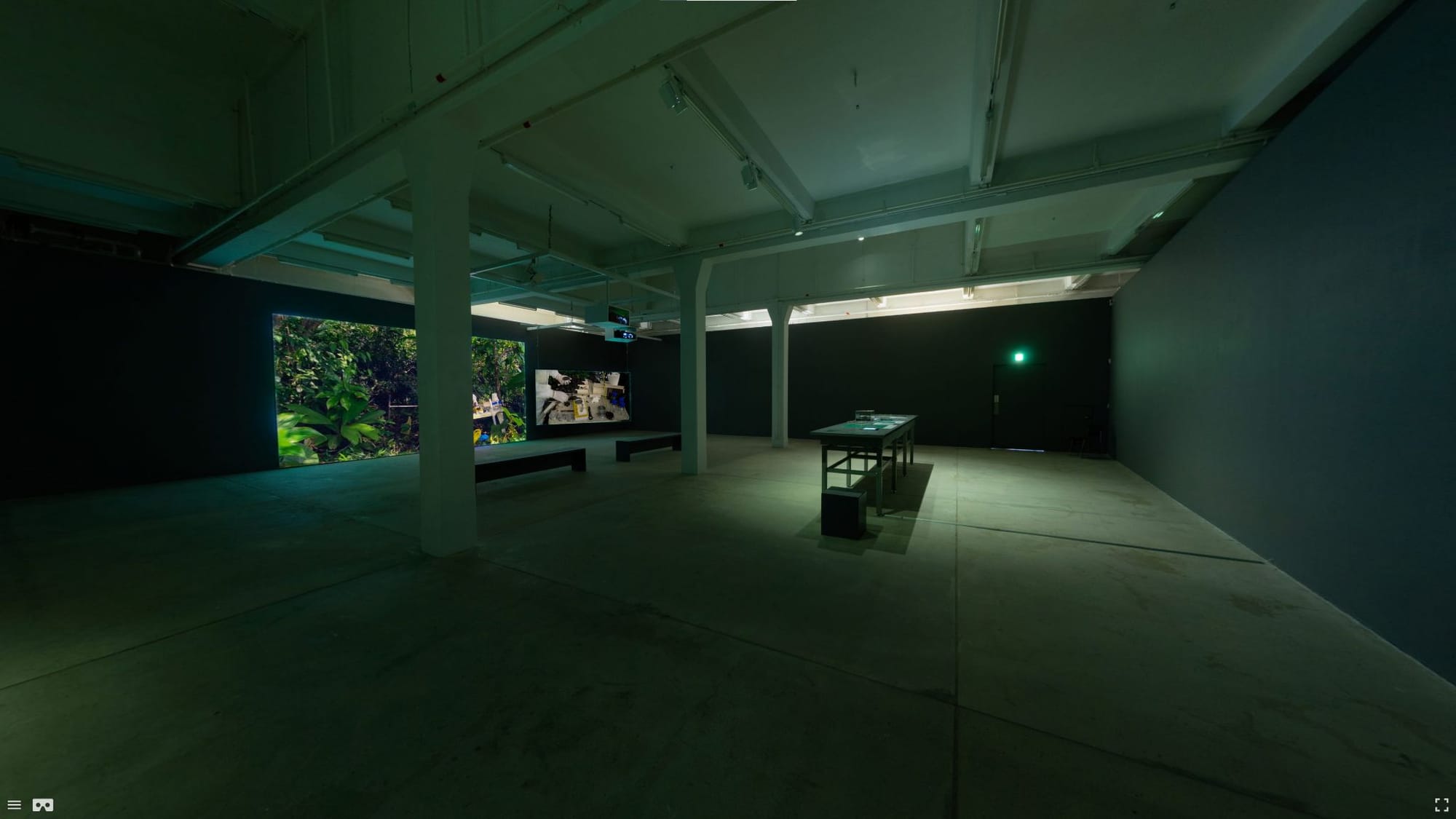
360 degree virtual exhibition screenshot from 'My Body Holds Its Shape' and 'Poetic Heritage'
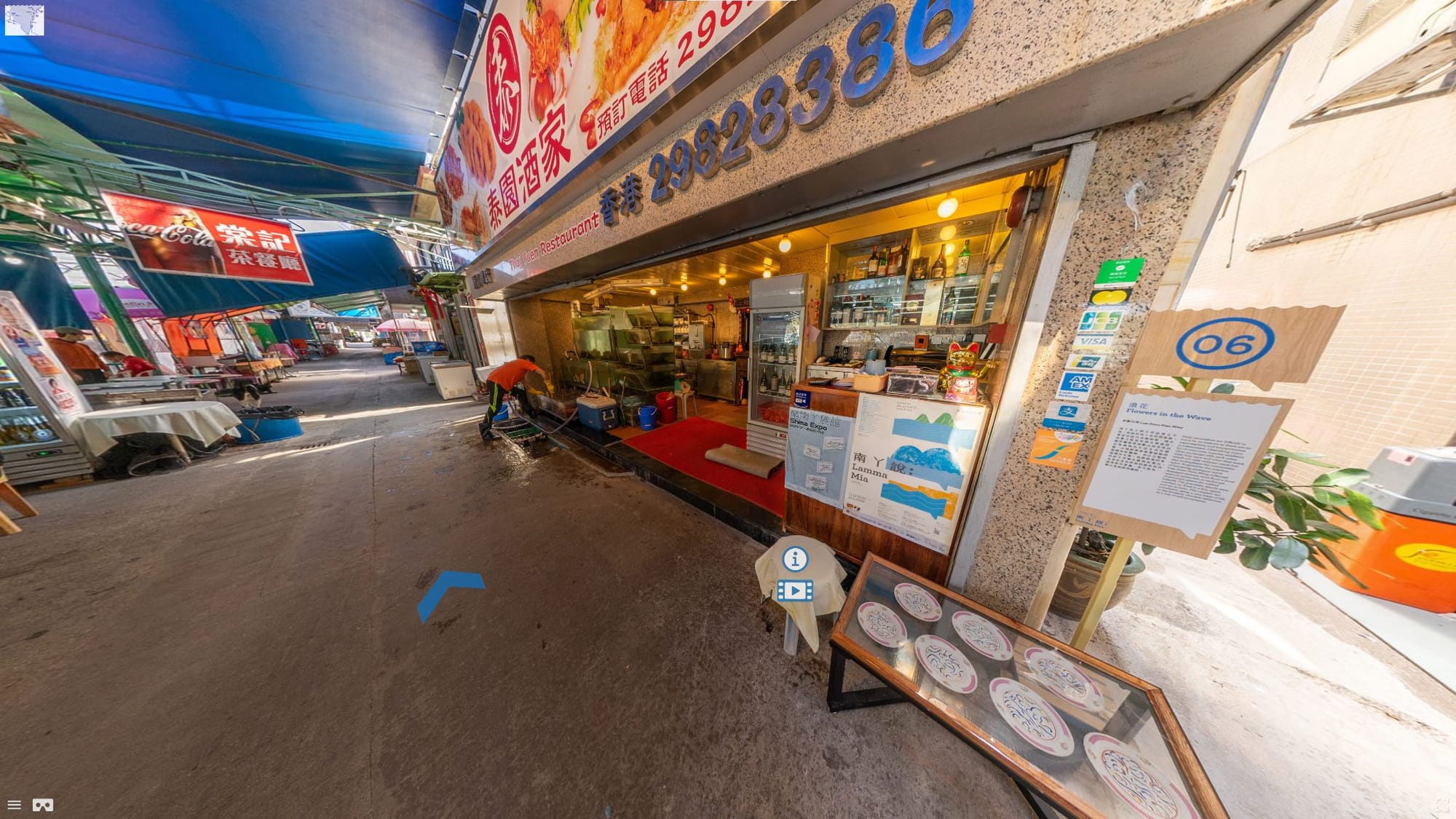
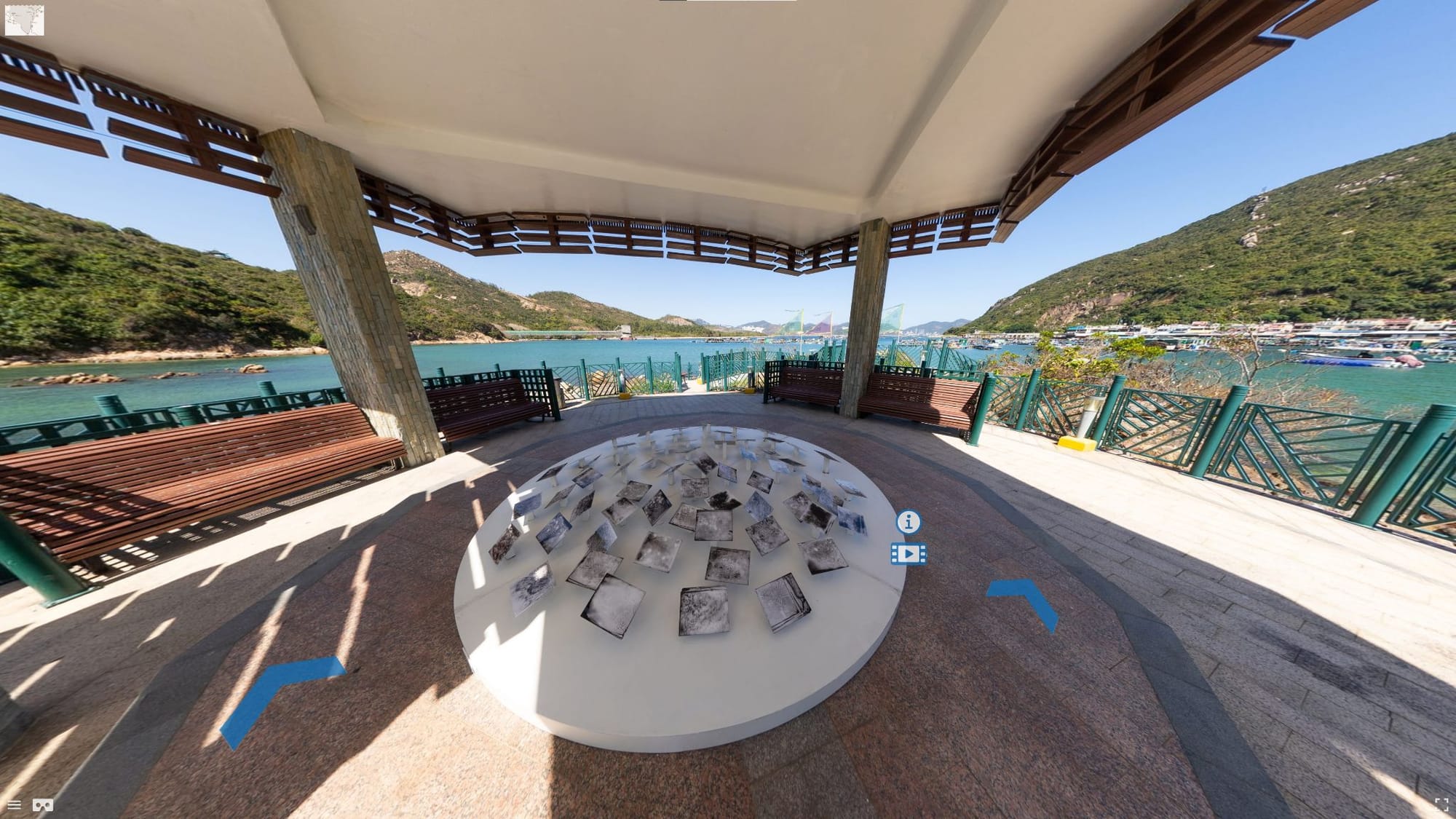
360 degree virtual exhibition screenshot from Lamma Mia
Campus Resources
[Table]
- Specifications
- Location
Adobe Premiere Pro
- Video and 360 video editing
- Software installed on four high-performance workstations. MakerSpace, Lower Ground Floor, Learning Garden, Chinese University of Hong Kong Library.
https://libguides.lib.cuhk.edu.hk/makerspace/highperformancew
Ricoh Theta Z
- 360 camera for capturing 360 images and videos.
- External Dimensions: 48 mm (W) x 132.5 mm (H) x 29.7 mm (D)
- Still Image Performance: 5376 x 2688 pixels
- Video Resolution Performance:
- 4K 3840×1920/29.97fps/56Mbps;
- 2K 1920×960/29.97fps/16Mbps;
- Maximum continuous recording time: 25 minutes
- Live Streaming Performance:
- 4K H264:3840×1920/29.97fps;
- 2K H264:1920×960/29.97fps
- MakerSpace, Lower Ground Floor, Learning Garden, Chinese University of Hong Kong Library.
https://libguides.lib.cuhk.edu.hk/makerspace/highperformancew
Glossary
[Glossary]
4K
- 4K resolution refers to a horizontal display resolution of approximately 4,000 pixels.
8K
- 8K resolution refers to a horizontal display resolution of approximately 8,000 pixels.
360° Video
- 360° Video is a spherical video format using dedicated 360° cameras usually played on virtual reality headsets.
Aspect Ratio
- The aspect ratio is used to describe the relationship between the width and height of the screen size. Common aspect ratios include 16:9 and 4:3
Bit Rate
- Is the amount of data being streamed per second of a video measured via kilobytes per second (kbps). Higher bit rates correspond with better video quality.
Colour Key/Chroma Key
- When shooting with a green screen or blue screen, it is necessary to use the colour key or chroma key tool in editing software to remove the green and blue background so that the main subject can be superimposed on another background.
Colour Grading/Colour Correction
- Colour correction involves adjusting brightness, hue and saturation and white-balance of a video image.
Compositing
- The merging of multiple layers of video to composite a final video.
Crop
- Resizing the borders of a video to decrease its size or to zoom in on something within the frame
Cut
- Separating different parts of a video clip for editing is known as a ‘cut’
Dissolve
- Slow fading out of the video to black or white to be used as a transition or ending to a video.
Export / Render
- The process of ‘exporting’ the video after the editing and postprocessing stage to create a final compressed video file that can be played back or uploaded.
Feathering
- Blurring the edges of a colour keyed or masked video image to blend it with the background, or to blend the edges of multiple 360 camera lens views to smooth
Frames-per-second (FPS)
- The number of individual images or frames in a video per second. The standard frame rate is 24 fps based on the frame rate of celluloid film. Higher frame rates such as 60fps will give smooth motion, or can be played back at a lower frame rate to give a slow motion effect
High Definition (HD)
- High definition is a resolution of 1920x1080 pixels with the aspect ratio of 16:9.
Masking
- Cutting out sections of a video to remove or occlude different sections.
Motion Graphics
- Text and image graphics are superimposed on video image involving motion and animation.
Transition/Cross-fade
- Merging between one video clip and a second video clip where the end and start of the two clips overlap for a brief period of time to create a smooth transition between the two clips.